Sloyd vs Image to 3D AI: Which AI 3D Model Generator is Better?
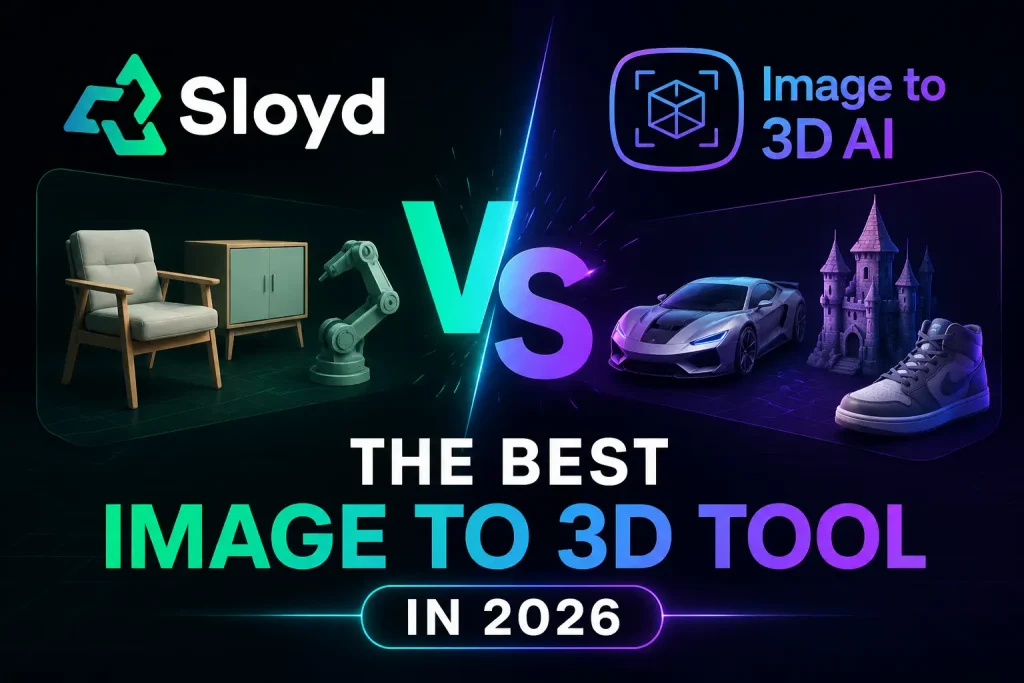
As AI-driven 3D generation tools become increasingly integrated into creative workflows, the landscape is splitting into two distinct directions. Some platforms prioritize comprehensive 3D pipelines with rigid mesh and topology control, while others focus purely on rapid, zero-friction conversion of 2D images into 3D models.
Both Sloyd and Image to 3D AI utilize advanced AI to generate 3D assets, but they serve vastly different workflows and design philosophies. This guide will break down their features, output quality, ease of use, pricing, and specific use cases to help you choose the ideal tool for your pipeline.
Sloyd vs Image to 3D AI Quick Comparison Table
To give you an immediate bird’s-eye view, here is a quick breakdown of how these two solutions stack up fundamentally against each other:
| Feature / Aspect | Sloyd | Image to 3D AI |
|---|---|---|
| Free Plan Available | ❌ | ✅ |
| Download Generated Models for Free | ❌ | ✅ |
| Manual Parameter Setup | ✅ | ❌ |
| Polycount Control | ✅ | ❌ |
| Topology Selection (Quad / Tri) | ✅ | ❌ |
| Beginner-Friendly Workflow | ❌ | ✅ |
| One-Click Generation | ❌ | ✅ |
| Structured Quad Topology | ✅ | ❌ |
| Animation & Rigging-Friendly Meshes | ✅ | ❌ |
| Automatic Depth Estimation | ❌ | ✅ |
| Automatic Texture Preservation | ❌ | ✅ |
| Watertight Mesh Generation | ❌ | ✅ |
| Direct 3D Printing Readiness | ✅ | ✅ |
| Manual Mesh Editing Focus | ✅ | ❌ |
| Rapid Concept Visualization | ❌ | ✅ |
| Multi-Image Workflow Support | ✅ | ❌ |
| WebAR / Interactive Display Use Cases | ❌ | ✅ |
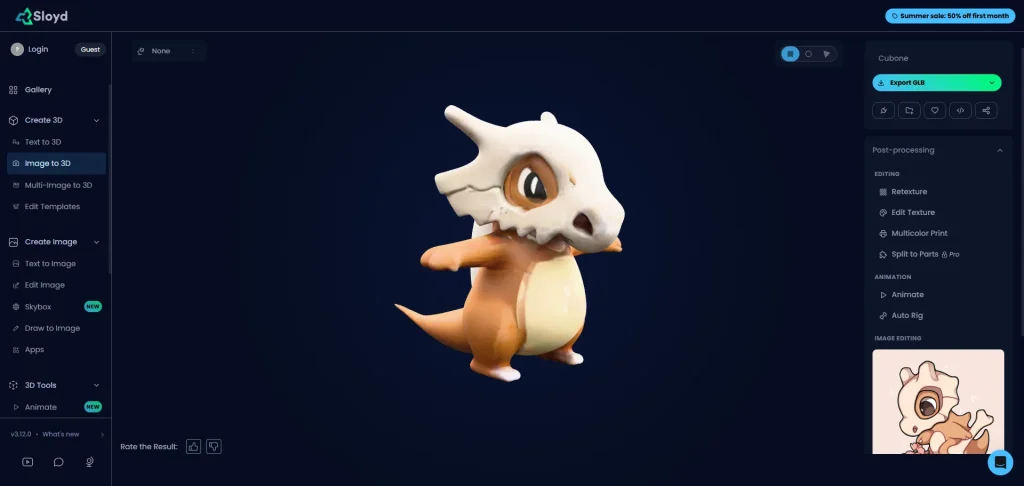
What Is Sloyd?
Key Features:
- Multimodal AI Creation
Transforms plain text prompts, single images, or multi-angle photos into highly detailed, textured 3D assets instantly, eliminating the need for manual poly-modeling. - Advanced Asset Editing
Provides robust post-processing tools to modify texture resolutions up to 2048×2048, retexture existing models, and split single meshes into separate, manageable parts for deep customization. - Automated Rigging & Motion
Features intelligent auto-rigging that instantly generates a skeletal structure for static models, allowing creators to apply animations and bring characters to life with minimal effort.
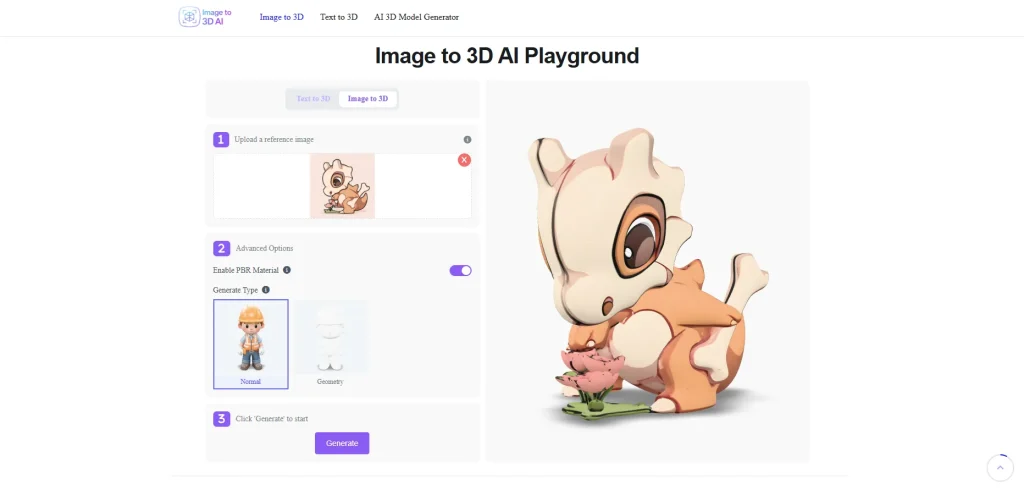
What Is Image to 3D AI?
Key Features:
- Frictionless Single-Image Reconstruction: Turn any standard 2D image into a production-ready 3D model with a zero-friction, one-click workflow.
- Rapid Prototyping Speed: Drastically cut design cycles by generating high-quality 3D assets in just minutes instead of days.
- Superb Real-World & AR Compatibility: Features advanced PBR material generation and flexible export types for seamless integration into modern AR/VR and 3D engines.
- Dual-Engine Creative Freedom: Seamlessly switch between Image to 3D and Text to 3D engines to balance precise reference matching with pure text-based creativity.
Key Differences Between Sloyd and Image to 3D AI
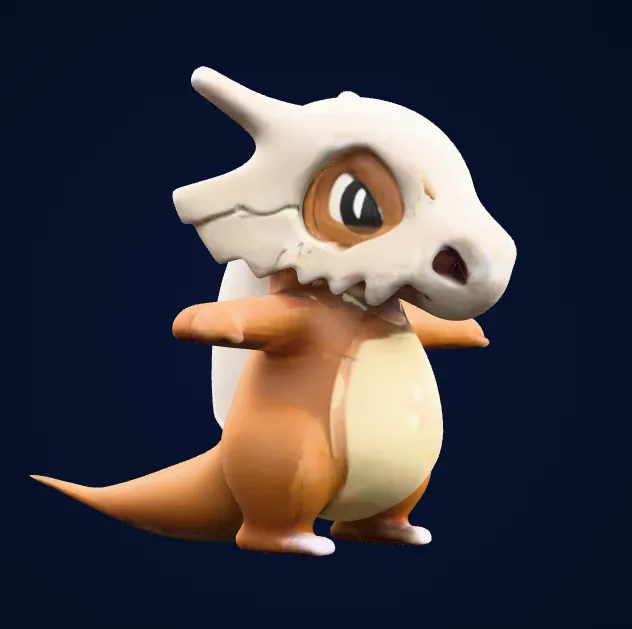
Generation Results Showcase

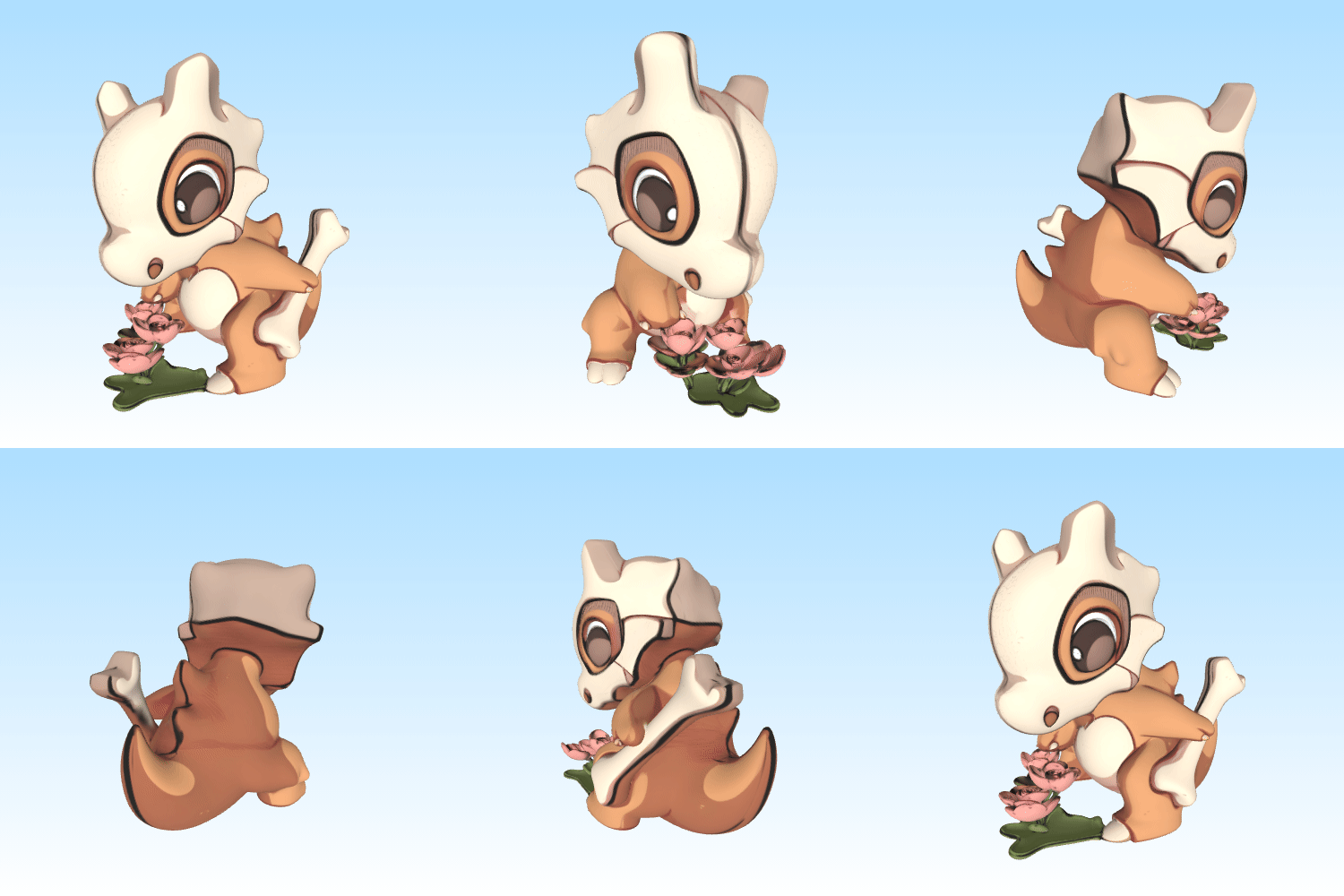
Sloyd
- Structured geometry
- Clean topology
- Optimized for downstream editing and game workflows
Image to 3D AI
- Strong texture preservation
- Higher visual fidelity
- Better suited for visualization and rapid prototyping
- Downloadable 3D models in standard export formats
Sloyd vs Image to 3D AI: Preparation & Setup
| Category | Sloyd | Image to 3D AI |
|---|---|---|
| Setup Simplicity | ❌ | ✅ |
| Quad Topology Control | ✅ | ❌ |
| Image-to-3D Automation | ✅ | ✅ |
| Texture Fidelity | ✅ | ✅ |
| Animation Pipeline Support | ✅ | ❌ |
| 3D Printing Readiness | ❌ | ✅ |
| WebAR Deployment | ❌ | ✅ |
| Beginner Friendliness | ❌ | ✅ |
| Technical Customization | ✅ | ❌ |
| Rapid Prototyping | ❌ | ✅ |
🛠️Sloyd AI: Industrial Blueprinting
⚡Image to 3D AI: Zero-Friction Environment Setup
Image to 3D AI eliminates the administrative and technical setup bottlenecks entirely. There are no environments to configure, no sliders to decipher, and no prior knowledge of mesh topology required.
- Democratic Access: Anyone on the team—from creative directors to 2D concept artists—can instantly initiate a project without waiting for a technical artist to set asset parameters.
- Elimination of Cognitive Load: By stripping away the intimidating dropdown menus of traditional 3D software, the setup phase becomes entirely invisible, letting users move from a 2D idea to a 3D canvas with a single click.
- Frictionless Batch-Prepping: Because the system automatically evaluates pixel depth and lighting profiles on the fly, setting up multiple concurrent asset pipelines requires zero preparation time or upfront technical mapping.
📌 Core Decision Logic for Setup:
Go with Sloyd AI if you are preparing a Structured Production Pipeline. Spending 1 minute to configure boundaries upfront saves hours of manual optimization down the road.
Go with Image to 3D AI if you are preparing a Rapid Concept Sandbox. When you just need fast visual confirmation without worrying about how the model is wired or animated, skip the setup hassle entirely.
Sloyd vs Image to 3D AI: Creation Workflow
| Feature | Sloyd | Image to 3D AI (Target Product) |
|---|---|---|
| Generates Structured Quad Meshes | ✅ | ❌ |
| Automatic Depth Reconstruction | ❌ | ✅ |
| Preserves Image Colors & Textures | ❌ | ✅ |
| Out-of-the-Box Automated Generation | ❌ | ✅ |
| Specialized for Technical Mesh Editing | ✅ | ❌ |
| Specialized for Rapid Asset Visualization | ❌ | ✅ |
🛠️ Sloyd AI: Parametric Pre-Budgeting
⚡ Image to 3D AI: Generate 3D models directly without configuring settings
In stark contrast, Image to 3D AI champions a completely democratized, single-click creation environment. It strips away the intimidating sliders and specialized 3D vocabulary, leaning entirely on automated asset translation.
- Automated Depth Mapping: The engine instantly calculates pixel depth vectors and spatial occlusion from a flat 2D canvas, eliminating the need for multi-angle references.
- Algorithmic Autonomy: By evaluating lighting profiles and contour gradients under the hood, it removes the cognitive load of pre-generation mapping, allowing non-technical designers to transition from a 2D concept to a 3D asset seamlessly.
📌 Core Decision Logic for Creation Workflow:
Go with Sloyd AI if you prefer a controlled, parametric workspace where upfront configuration saves hours of optimization later in the pipeline.
Go with Image to 3D AI if you require an agile, friction-free sandbox that prioritizes immediate creative velocity over manual parameter setup.
Sloyd vs Image to 3D AI: Output Quality & Mesh Topology
| Feature | Sloyd | Image to 3D AI (Target Product) |
|---|---|---|
| Free, Unrestricted Asset Exports | ❌ | ✅ |
| Clean Mathematical Quad Topology | ✅ | ❌ |
| Animation-Friendly Edge Loops | ✅ | ❌ |
| High-Fidelity Color Texture Preservation | ❌ | ✅ |
| Dense, Gap-Free Watertight Shells | ❌ | ✅ |
| Ready for Consumer Display Immediately | ❌ | ✅ |
🛠️ Sloyd: Production-Ready Wireframes
Sloyd’s output quality is measured by its mathematical precision rather than raw visual flash. It generates clean, optimized Quad (Four-Sided) topology featuring predictable edge loops. This technical fidelity makes the exported meshes instantly compatible with standard Digital Content Creation (DCC) tools like Blender or Maya. Technical artists can immediately perform loop cuts, clean beveling, and vertex weight-painting without wasting time on tedious retopology or manual mesh cleanup.
⚡ Image to 3D AI: High-Fidelity Color Sculptures
Image to 3D AI prioritizes instant visual realism and out-of-the-box display readiness. Its output manifests as an organic, dense Triangle array engineered to retain the exact aesthetic nuances of the source image.
- Texture & Color Baking: The mesh perfectly preserves baked-in highlights, complex shadows, and subtle color gradients, making manual UV unwrapping entirely obsolete.
- Watertight Integrity: It outputs a perfectly closed, gap-free geometric shell, ensuring the model is immediately optimized for web-based rendering engines or physical fabrication.
📌 Core Decision Logic for Output & Topology:
● Go with Sloyd AI if you require a malleable structural blueprint optimized for downstream deformation, manual skinning, and strict polygon budgets.
● Go with Image to 3D AI if you demand a visual masterpiece—a fully textured, ready-to-display model optimized for immediate spatial viewing or 3D printing.
Sloyd vs Image to 3D AI: Pricing & Plans
| Metric | Sloyd AI | Image to 3D AI |
|---|---|---|
| Pricing Model | Tiered Monthly Subscription | 100% Free (No Hidden Costs) |
| Base Plan Cost | $15/mo (Plus) | $50/mo (Pro) | $0 / Always Free |
| Generation Quotas | Strictly Limited (e.g., Gated High-Poly Tasks) | Uncapped / Unlimited Generations |
| Export Restrictions | Gated Behind Premium Paid Tiers | Free, High-Fidelity Asset Exports |
🛠️Sloyd: Premium Tier Gatekeeping
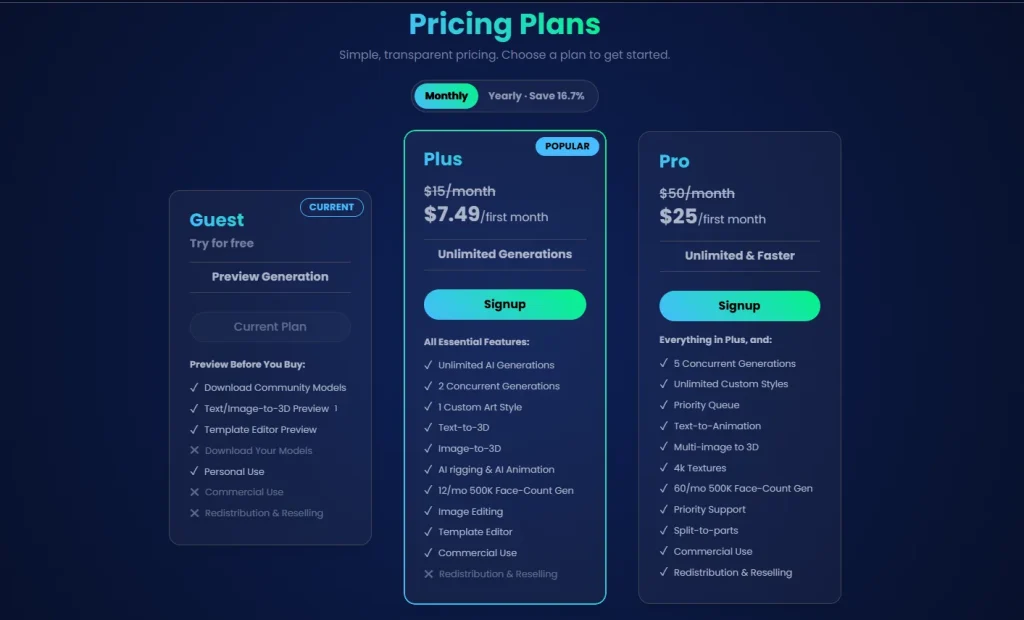
Sloyd’s pricing structures workflows around rigid technical limits and pipeline bottlenecks. While the entry tier provides base access, it restricts creators to 2 concurrent tasks and imposes a strict ceiling of 12 high-poly (500K face-count) generations per month. Crucial production tools—like multi-image inputs, split-to-parts, and 4K textures—require upgrading to the $50/mo Pro tier, turning asset budgeting into an exercise in quota management.
⚡Image to 3D AI: Democratized Value Scaling
Image to 3D AI eliminates artificial caps and performance throttling, ensuring that full-scale 3D asset generation remains predictable and accessible.
- Uncapped High-Poly Sculpting: Polygons are not counted, and high-fidelity outputs are not rationed. Every tier enjoys full access to dense triangle meshes, advanced depth mapping, and detailed color baking without monthly generation limits.
- True Concurrent Workflows: The creation process does not wait in a queue. The platform allows massive parallel rendering right out of the box, meaning teams can process entire batches of 2D images into 3D objects simultaneously without tier upgrades.
- Zero Feature-Gating: Advanced texturing, rich organic curves, and direct AR/3D-print exports are standard across the platform, removing hidden cost barriers and maximizing the return on investment.
📌 Core Decision Logic for Output & Topology:
● Go with Sloyd AI if you require a malleable structural blueprint optimized for downstream deformation, manual skinning, and strict polygon budgets.
● Go with Image to 3D AI if you demand a visual masterpiece—a fully textured, ready-to-display model optimized for immediate spatial viewing or 3D printing.
Sloyd vs Image to 3D AI: Practical Use Cases
| Use Case | Sloyd | Image to 3D AI (Target Product) |
|---|---|---|
| Game Development Base Meshes | ✅ | ❌ |
| Character Rigging Workflows | ✅ | ❌ |
| Animation Pipelines | ✅ | ❌ |
| E-commerce Product Visualization | ❌ | ✅ |
| WebAR Deployment | ❌ | ✅ |
| Free 3D Printing Preparation | ❌ | ✅ |
| Marketing Content Creation | ❌ | ✅ |
| Rapid Concept Validation | ❌ | ✅ |
🛠️Sloyd: Game Engine & Technical Animation Pipelines
⚡Image to 3D AI: Instant Visual Deployment & Physical Realization
Image to 3D AI serves use cases that demand high visual fidelity and immediate operational utility without manual 3D modeling intervention.
- E-Commerce & Interactive Marketing: Instead of waiting days for custom 3D renders, marketing teams can instantly convert 2D product photography into interactive, full-color Web-AR elements. These assets can be directly embedded into digital storefronts, allowing consumers to rotate and view realistic merchandise in 360 degrees.
- Rapid 3D Printing & Physical Prototyping: For hobbyists, industrial designers, and prop makers, the platform creates perfectly closed, watertight shells. This allows users to bypass the tedious process of manual STL healing and send organic 2D concept art directly to slicing software for immediate physical fabrication.
- Immersive Digital Content & Spatial Computing: The organic, high-fidelity triangle sculpting naturally preserves complex shading profiles and texture gradients. This makes it ideal for populating virtual galleries, spatial computing environments, and digital lookbooks where visual realism outweighs the need for mechanical wireframe editing.
📌 Core Decision Logic for Practical Use Cases:
● Go with Sloyd AI if the target destination is an active Game Development Engine or Film Animation Rig. It is built specifically for pipelines where technical artists are available to manually skin, rig, and optimize structured geometry.
● Go with Image to 3D AI if the target destination is Immediate Consumer Facing Display or 3D Printing. It is engineered for workflows that bypass technical 3D modeling bottlenecks entirely, delivering stunning, full-color, ready-to-deploy digital and physical assets directly from 2D imagery.
Conclusion
The divide between Sloyd and Image to 3D AI isn’t just a difference in features—it is a fundamental split in production philosophy. Choosing the right tool comes down to where you want to spend your time and what your final pipeline demands.
- Sloyd AI is built for the traditional 3D pipeline. It is an indispensable drafting asset for game developers, technical artists, and animators who require strict, parametric control over their geometry. By prioritizing clean Quad topology and pre-budgeted mesh constraints, Sloyd trades immediate generation speed for seamless downstream editing, rigging, and game engine optimization.
- Image to 3D AI is engineered for the modern visual economy. It strips away the technical friction of traditional 3D software to offer an agile, zero-friction gateway for graphic designers, e-commerce brands, and content creators. By focusing on rapid single-image reconstruction, brilliant PBR color baking, and watertight geometric shells, it shifts the workflow from tedious technical modeling to instant visual deployment.
The Final Verdict
If your asset needs to bend, animate, and fit into a rigid game engine budget, invest in the structural precision of Sloyd.
If your asset needs to look stunning, launch instantly, and engage an audience on a web storefront, spatial app, or 3D printer, leverage the friction-free velocity of Image to 3D AI.