How to Make 3D Models in Minutes (Ultimate Beginner's Guide)
Have you ever tried opening Blender or Maya, only to close it 10 minutes later feeling completely overwhelmed? You’re not alone. Traditional 3D modeling is notorious for its steep learning curve. Mastering topology, sculpting, and UV mapping can take months of dedicated study, and even an experienced artist might spend days crafting a single base model.
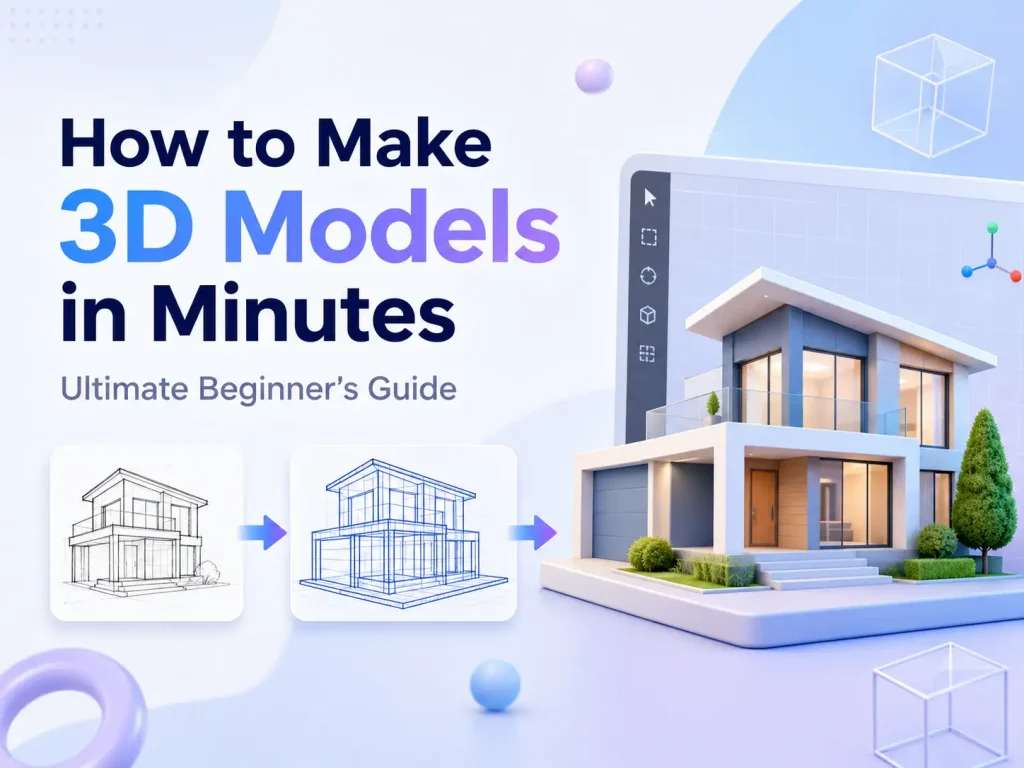
But what if you could bypass the technical headache entirely? Thanks to the power of generative AI, you no longer need years of training to bring your ideas into the third dimension. Whether you have a reference image or just a creative concept in mind, you can now use an advanced Image to 3D AI to create production-ready, high-quality 3D assets in minutes.
In this ultimate beginner’s guide, we’ll show you exactly how to fast-track your 3D workflow, preview assets in real-time, and export them into industry-standard formats.
AI 3D Generation vs. Traditional 3D Modeling
| Feature | 📝 Traditional 3D Modeling (Blender/Maya) | ⚡️ Image to 3D AI Generation |
|---|---|---|
| Learning Curve | Extremely Steep (Months to Years) | Zero Experience Required (Minutes) |
| Time to Asset | Hours to Days per Model | 1 to 3 Minutes |
| Hardware Requirements | High-end GPU & Powerful PC | Cloud-based (Runs on Any Browser) |
| Texturing / PBR | Manual Painting and Mapping | Automatically Generated Instantly |
| Best Used For | Complex Hero Assets & Bespoke Animations | Rapid Prototyping, Indie Games, eCommerce |
Step-by-Step Guide: How to Generate AI 3D Models Fast
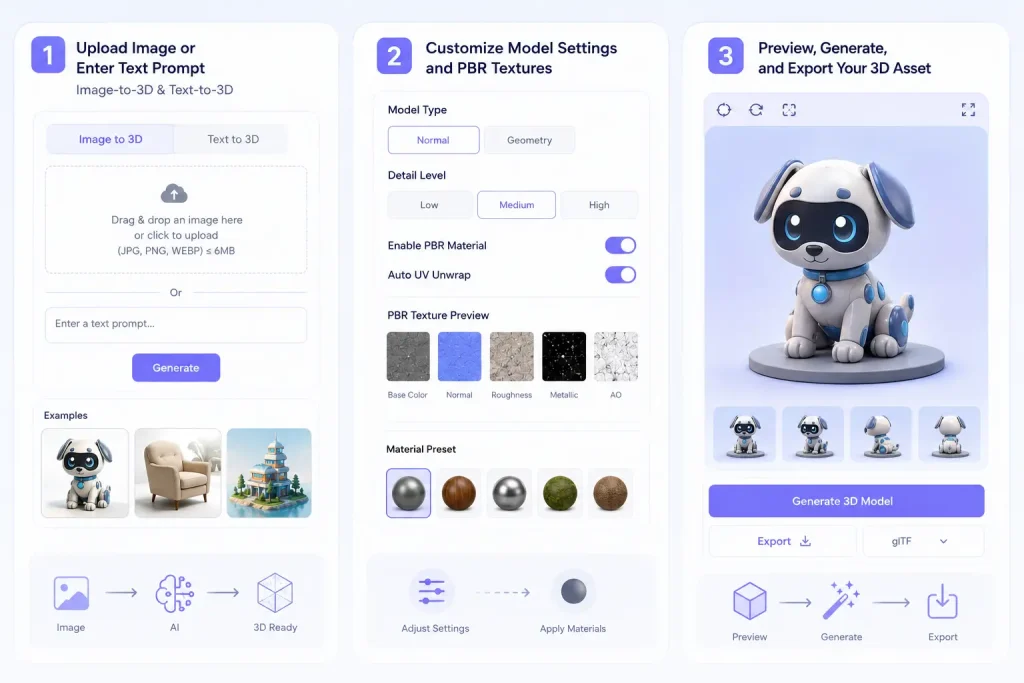
Ready to build your first model? Our platform is designed for a completely frictionless experience. Just head over to our official Image to 3D AI tool, select the Image-to-3D mode to start a project, and take advantage of our Image to 3D generator free trial. You can generate your first asset instantly—no signup required!
To get the most out of an AI 3D model generator, following a standardized workflow is key to consistency. Here is how it works step by step:
Step 1: Upload Your Image or Enter a Text Prompt (Image-to-3D & Text-to-3D)
The journey begins with your concept. You have two powerful entry points:
- Text-to-3D (Prompt-Based Generation): If you can describe it, you can create it. This method allows you to type a highly descriptive text prompt detailing the object, style, and surface characteristics you want to generate. The advanced AI engine analyzes your descriptive keywords—such as “A futuristic sci-fi drone, hyper-detailed, cyberpunk style, matte black finish”—and interprets the spatial structure, depth, and geometric proportions to build a complex mesh entirely from your textual description using our advanced Text to 3D generator.
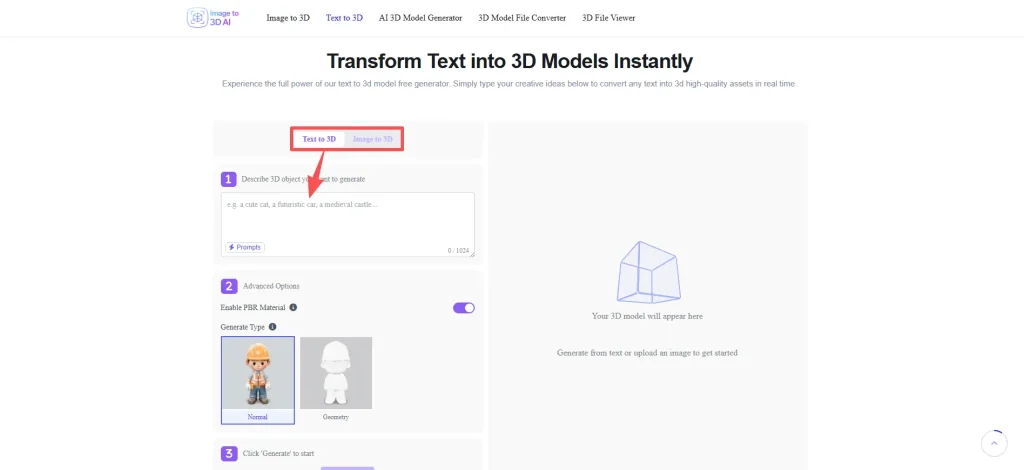
- Image-to-3D (Reference-Based Generation): If you already have a 2D reference sketch, character concept art, or a product photograph, you can upload it directly. The AI instantly performs a deep depth-estimation analysis on your image. It intelligently extracts the visual boundaries, contours, and lighting information to map out a fully dimensional, symmetrical 3D object based on that single 2D input. This effectively bypasses the hours of manual blueprint alignment required in traditional modeling pipelines.
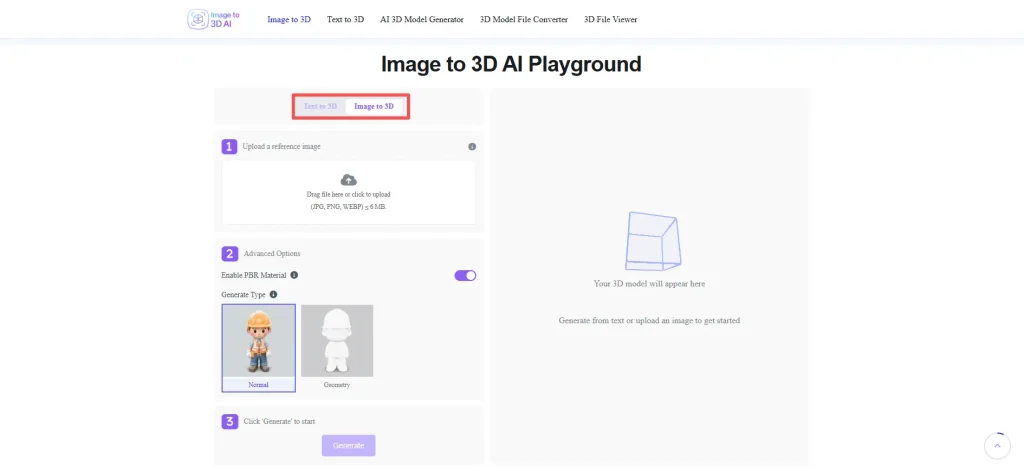
Step 2: Customize Model Settings and PBR Textures
Once our AI engine has processed your initial text prompt or reference image, you enter the refinement stage. Unlike traditional pipelines where you would spend hours manually unwrapping UV coordinates and painting maps in external software, our platform automates the entire texturing process while still giving you granular control over the final look.
The tool utilizes PBR (Physically Based Rendering) workflows, which ensure that your 3D models interact realistically with digital lighting environments by utilizing a set of dedicated material maps:
- Albedo / Diffuse Map: This controls the base color and surface patterns of your model, free from any baked-in shadows or highlights.
- Roughness Map: This determines how light scatters across the surface. Lowering the roughness creates a glossy, mirror-like finish (perfect for polished metals or glass), while increasing it gives a matte, diffuse texture (ideal for fabric, brick, or rust).
- Metallic Map: This defines which parts of your model are made of raw metal versus non-metal (dielectric) materials, ensuring realistic reflections when imported into modern game engines.
🔗 Pro Tip: Keep your textures clean by avoiding harsh, artificial lighting in your original prompt descriptions or uploaded images. Letting the AI focus on neutral lighting ensures that the automatically baked PBR textures will look stunning and highly realistic when imported into any external game engine or web viewer later on.
Step 3: Generate, Inspect and Refine via the 3D Viewer
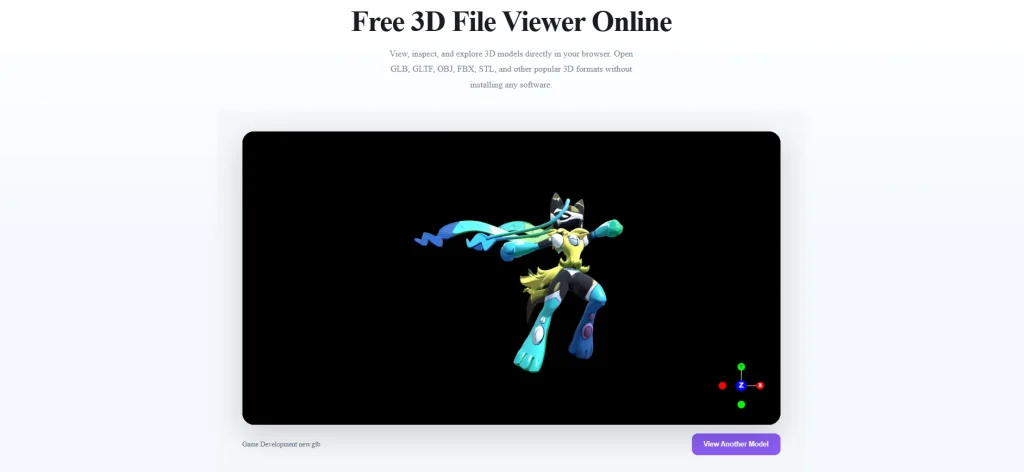
With your inputs locked in and your material settings optimized, click the “Generate” button. Within 1 to 3 minutes, the cloud-based AI processes your parameters, bakes the textures, aligns the vertices, and presents your complete, production-ready 3D object.
Before downloading, you can fully inspect your creation using our high-performance Interactive 3D Web Viewer. This allows you to:
- 360-Degree Rotation & Zoom: Simply drag, orbit, and zoom around the asset to inspect the symmetry, depth, and mesh layout from every angle.
- Real-Time Texture Inspection: Verify that the automatically generated textures and surface details look crisp and seamless across the entire model before you save it.
Once you are satisfied with the real-time preview, it’s time to choose your output. If the default format isn’t exactly what your project pipeline requires, you don’t need to worry about using heavy, complicated third-party software.
🔄️Step 4: Export via the 3D File Converter (GLB, 3MF, OBJ, STL)
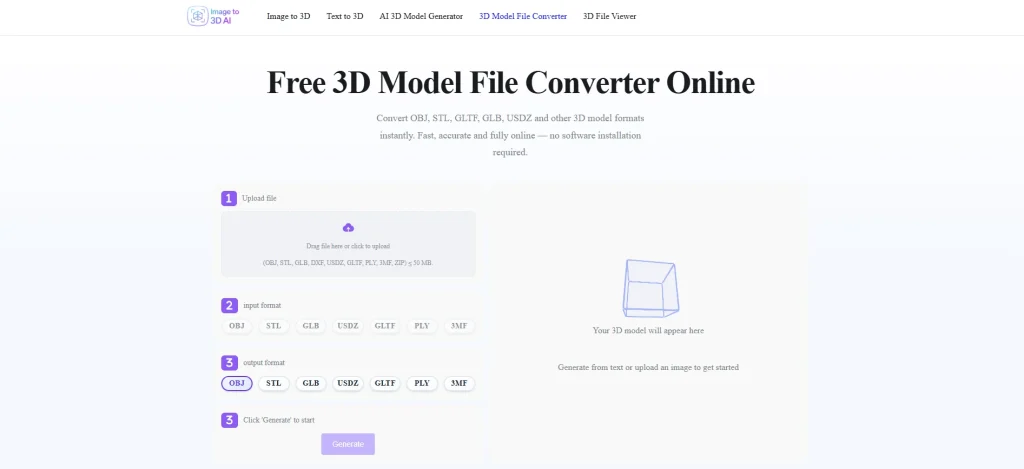
Once you are satisfied with the real-time preview, it’s time to choose your output. Compatibility issues are a thing of the past. If you need a specific file extension for your project pipeline, you don’t need to open heavy, complicated third-party software. Our 3D Model File Converter engine lets you transform your asset into the perfect format with just one click:
- OBJ & PLY: The standard formats for high-fidelity 3D meshes and color data, perfect for importing into major design software like Blender or Maya.
- GLB & GLTF: The gold standard for web deployments, online stores (like Shopify), and interactive AR/VR applications due to their optimized, small file sizes.
- USDZ: The native format for Apple’s AR ecosystem, making it essential if you are building Augmented Reality experiences for iOS devices.
- STL & 3MF: The essential, watertight formats required for modern slicing software and physical 3D printing.
👤Who Is AI 3D Modeling For? (Top Use Cases)
AI 3D generation is no longer just a novelty for tech enthusiasts—it is actively transforming industries by cutting production costs, removing technical barriers, and accelerating creative timelines. Here is who is benefiting most from this technology:
- Indie Game Developers (Speed Up Asset Pipelines): Building an indie game often means working with a tight budget and a punishing schedule. Instead of spending weeks manually box-modeling environmental props, loot crates, or background assets, developers use AI to rapidly build their game worlds and protoype layouts in a fraction of the time.
- Ecommerce Brands (Interactive Product Displays): Static product photos are losing their edge. Online store owners are converting standard 2D product images into interactive 3D assets to build immersive 360-degree web viewers or Augmented Reality (AR) “try-on” experiences, which significantly boosts buyer confidence and conversion rates.
- 3D Printing Creators (From Idea to Physical Model): If you love 3D printing but lack digital sculpting skills, AI completely bridges the gap. By turning simple sketches, character designs, or text concepts directly into watertight STL or 3MF files, hobbyists can take a concept from their imagination to their physical printing bed on the exact same day.
- Interior Designers & Architects (Instant Prop & Furniture Staging): Creating realistic mood boards and 3D spatial layouts usually requires hunting through endless catalogs for specific furniture models or modeling custom assets from scratch. Interior designers can now turn client sketches or reference photos of bespoke furniture directly into 3D assets in minutes, allowing for rapid, interactive scene staging and realistic spatial previews.
- Educators & Researchers (Immersive Visual Learning): Abstract concepts, historical artifacts, and complex anatomical structures can be difficult to explain with flat 2D images. Educators are leveraging AI to instantly transform text descriptions or historical photographs into interactive 3D assets. These models can be brought into the classroom via Augmented Reality (AR) or flipped classroom models, providing students with a hands-on, immersive learning experience that boosts retention.
🎯Conclusion: The Future of 3D Modeling is AI-Driven
The barrier to entry for 3D creation has officially collapsed. While traditional modeling software will always have its place for high-end studio animations and hyper-bespoke hero assets, AI-driven generation offers an unprecedented level of speed, accessibility, and sheer efficiency for everyday creators, developers, and online entrepreneurs.
You no longer need to spend months struggling with a steep learning curve or expensive software packages just to see your ideas take shape. It’s time to streamline your digital workflow and bring your concepts into the third dimension effortlessly.
Try our Image to 3D AI Tool for free today and transform your text prompts or 2D images into production-ready 3D models in just a few minutes!